Turn Any Folder into an MCP Service
I just spent four days building something I’ve needed for months.
The problem: I have a growing collection of internal resources like design tokens, brand guidelines, utility scripts, and data transformation tools that I want my AI agents to be able to use. The Model Context Protocol gives agents a standard way to discover and call external tools and read external resources. But actually serving those resources over MCP requires writing a server, handling the transport protocol, defining JSON schemas for every tool’s inputs, managing ports, and bolting on authentication. For every single service. Every time.
It’s the equivalent of hand-writing HTTP servers to serve static files. We solved that problem for the web decades ago. Nobody should have to solve it again for MCP.
The idea
What if exposing resources to agents was as simple as deploying a website on Vercel? You put files in a folder. The platform figures out the rest. Markdown files become readable resources. Python scripts become callable tools. The schemas, the transport, the auth. All handled automatically.
That’s AnyMCP. Drop files into a folder structure, run any-mcp start, and you have a live MCP service with a web dashboard, per-service authentication, and auto-generated tool schemas. One command.
Here’s how it came together.
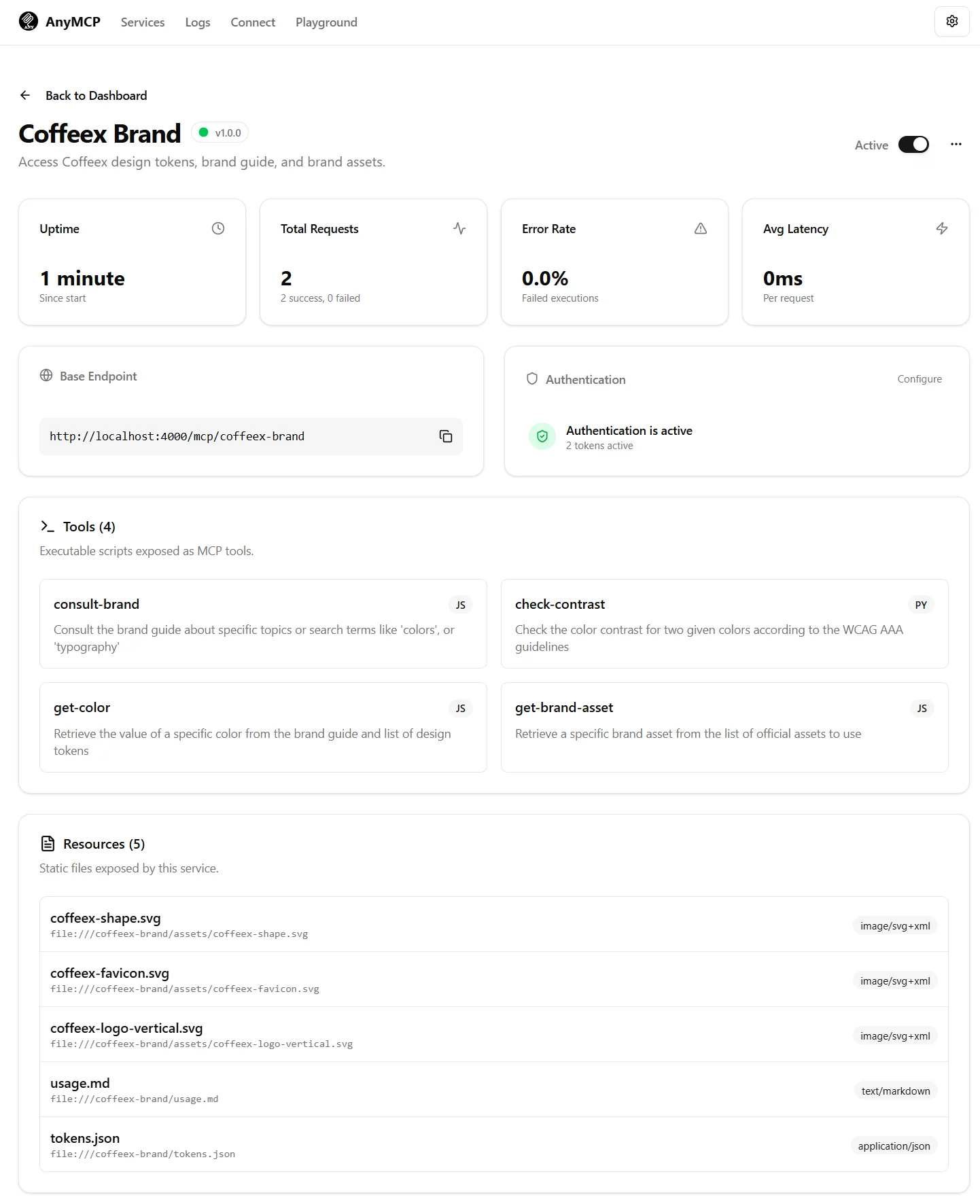
Monday. Started with a Next.js scaffold at 10:45am. By the afternoon I had a working MCP server that could serve resources from a folder and execute scripts as tools. I also built a demo service, a brand design system for a fictional company with design tokens in JSON, usage guidelines in Markdown, brand assets as SVGs, and tools like a contrast checker in Python and a color lookup in JavaScript.
The first big decision happened late Monday: I’d been hand-rolling the JSON-RPC protocol that MCP uses under the hood. Halfway through, I stopped and switched to the official @modelcontextprotocol/sdk. The hand-rolled version worked but it was going to be a maintenance burden, and the official SDK would track protocol changes automatically. This is the kind of decision that feels like slowing down but saves you weeks later.
Tuesday. The killer feature landed. I hooked up an LLM to analyze scripts when they’re added to a service and auto-generate the JSON input schema. This is the thing that makes the convention-over-configuration promise real. Without it, every tool requires you to hand-write a JSON Schema describing its inputs: the type of each parameter, which are required, what the descriptions are. With it, you drop a Python script into a folder and the system reads the code, understands what it does, and generates the schema for you.
The script execution contract is deliberately simple: the tool receives JSON on stdin, writes its result to stdout, logs to stderr, and the exit code indicates success or failure. Any language that can read stdin and write stdout works: Python, Node, Bash, Ruby, compiled binaries. The contract is the interface, not the language.
Also Tuesday: activity logging and health monitoring per service. I want to know which agents are calling which tools, how often, and whether they’re succeeding.
Wednesday. The project transformed from a web app into a proper CLI tool. any-mcp init creates a new project. any-mcp start launches the server. any-mcp add-service scaffolds a new service. The web dashboard is embedded, the same pattern as Beats, where I embedded a React frontend in a Go binary. Here it’s a Next.js app that serves both the dashboard and the MCP endpoints from the same process.
I also built a playground, a built-in testing UI where you can call tools with sample inputs and see the responses without needing an actual AI agent connected. And MCP client config generation: click a button and get the JSON snippet you need to paste into Claude’s, VSCode’s, or OpenCode’s MCP configuration. Copy, paste, connected.
Thursday. Authentication. The largest single commit of the project, 1,265 lines across 37 files. Login page for the dashboard, bearer token authentication for the API, per-service MCP token management with generate, rotate, and invalidate. Tokens display once and never again. Auth guard middleware on every route.
This matters because MCP services often expose internal resources: internal documentation, proprietary tools, data that shouldn’t be public. Without authentication, running AnyMCP is like running an unsecured API. Every MCP service gets its own token, so you can give different agents access to different services and rotate credentials independently.
What it looks like in practice
Say you have a brand design system you want your agents to follow. You create a folder structure:
services/
  brand/
    resources/
      colors.json
      typography.md
      logo-guidelines.md
    tools/
      check-contrast.py
      get-color.js
Run any-mcp start. The platform:
- Discovers the
brandservice - Serves every file in
resources/as a readable MCP resource - Analyzes every script in
tools/, auto-generates input schemas, and exposes them as callable MCP tools - Generates a per-service auth token
- Starts the web dashboard with a playground for testing
Your AI agent connects with the token, discovers what’s available, and can now read your brand guidelines and call your contrast checker natively. No glue code. No JSON-RPC plumbing. No schema writing.
When you add a new file, whether you drag and drop it in the dashboard or just put it in the folder, it’s live immediately. The LLM analyzes new tools on arrival and generates their schemas without you touching a config file.
Why this matters
MCP is the protocol that makes AI agents useful beyond the conversation window. An agent that can only respond to prompts is a chatbot. An agent that can read your documentation, call your internal tools, and access your data is an actual assistant.
But the barrier to serving MCP has been too high. You need to understand the protocol, write a server, handle transport, define schemas. Most teams don’t have time for that, so their agents operate in a vacuum, powerful language models with no access to the context that would make their output useful.
AnyMCP eliminates that barrier. If you can put files in a folder, you can serve MCP. The convention-over-configuration approach means you don’t need to understand the protocol at all. The auto-schema generation means you don’t need to write JSON Schema. The embedded dashboard means you don’t need a separate monitoring tool.
What I’m thinking about
I keep coming back to the parallel with web hosting. In the early days of the web, serving a website meant configuring Apache, writing virtual host configs, managing SSL certificates, setting up log rotation. Then platforms like Vercel made it: push code, get a website. The complexity didn’t disappear. It got absorbed by the platform.
MCP is at the Apache stage. AnyMCP is an attempt to push it toward the Vercel stage. Whether that’s the right abstraction, I’ll find out by using it. Every internal tool at KUY.io is getting an AnyMCP service this month. If it survives contact with real use cases, it’ll survive anything.
AnyMCP is open source: github.com/palarix/any-mcp.