Reviewing Documents with AI Should Be Better
I’ve been writing a lot of PRDs and design docs in Markdown lately. The AiSE process generates specs, the planning track produces product briefs, and every project has architectural decision records accumulating in the repo. All Markdown. All reviewed by a mix of humans and AI agents.
The review workflow is terrible.
When I want Claude Code to review a document and incorporate my feedback, I have two options. I can describe my comments in prose in the chat:
"In the section about authentication, change the approach from JWT to session tokens,
and in the data model section, the relationship between users and teams should be
many-to-many not one-to-many."
This works but it’s lossy. The AI has to find the passages I’m referring to, guess at the boundaries, and hope it understood which part I meant.
Or I can manually edit the document with inline annotations, save, and tell Claude to read it. This works better but it’s tedious and pollutes the document with review artifacts.
What I actually want is Google Docs-style inline commenting, but purpose-built for the Claude Code workflow. Select a passage, write a comment, send the whole review in one shot. Structured feedback with exact quotes and locations, formatted so the AI can act on it precisely.
Claude Review
Thus, the idea for the Claude Review VS Code extension was born.
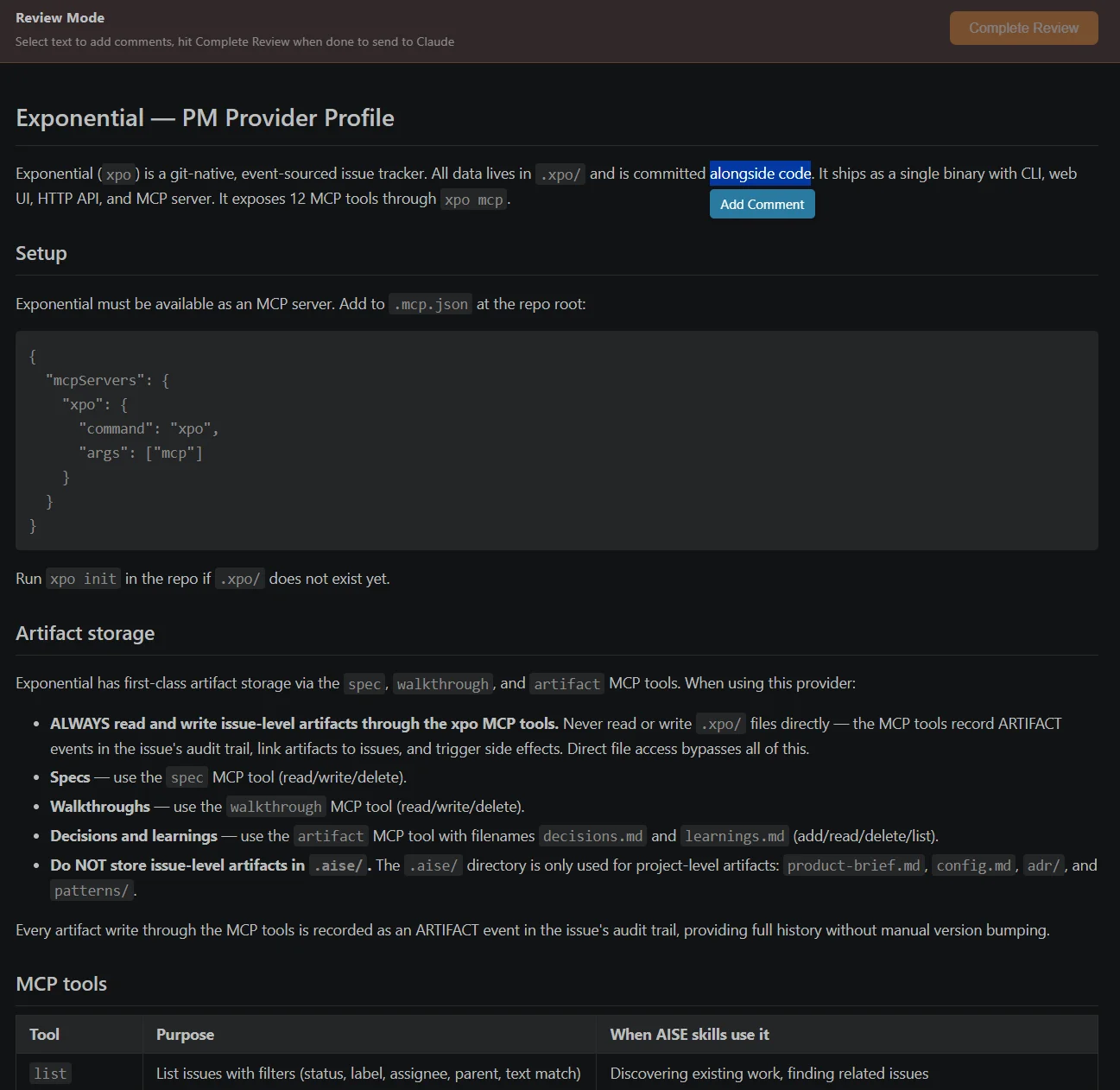
Open any Markdown file and select “Open in Claude Review.” The document renders in a panel with full Markdown formatting. Select any passage of text and a floating “Add Comment” button appears. Click it, write your feedback, and the passage gets highlighted with a numbered badge. A sidebar on the right collects all your comments.
Each comment captures the exact quoted text, its location in the document’s heading hierarchy as a breadcrumb trail (like “Overview > Context > Assumptions”), and your feedback. When you’re done, click “Complete Review” and it goes straight into Claude Code’s chat. The extension opens the sidebar, focuses the input, pastes the formatted review, and auto-submits. One click from “I have opinions” to “Claude is working on revisions.”
The output format is deliberate. Instead of dumping raw text, each comment is structured so Claude can parse it unambiguously:
## Comment 1
**Section:** Overview > Context > Assumptions
**Selected text:** "The system assumes all users have..."
**Feedback:** This assumption doesn't hold for enterprise
customers who use SSO. We need to handle federated identity.
No guessing about which passage. No ambiguity about location. The AI gets exactly what it needs to make targeted changes.
Building the extension
The whole thing came together in one session. The architecture is simple: a VS Code webview panel that renders Markdown using the marked library, with inline JavaScript handling text selection, comment creation, and the floating UI. No framework, just a single HTML template with vanilla JS and CSS that uses VS Code’s theme variables so it looks native in any theme.
The trickiest part was text selection. The user selects rendered HTML but the comment needs to reference the original Markdown position. I solved this with breadcrumb trails. Walking up the DOM from the selection to find the nearest heading ancestors gives you a stable, human-readable location reference that’s also useful for the AI.
The other tricky bit was the Claude Code integration. VS Code extensions can execute other extensions’ commands, so I use claude-vscode.sidebar.open to open the chat panel, paste the formatted review via the clipboard, and then trigger a submit. There’s a 200ms delay to let the UI settle, the kind of thing that feels hacky but works reliably.
I use the extension all day and immediately noticed three things that bothered me:
First, the comments sidebar was blocking content on narrower editor layouts. Fixed the CSS.
Second, selecting text in the sidebar to copy it was triggering the “Add Comment” button. Scoped the selection listener to the content area only.
Third, comments disappeared when the webview was hidden and re-shown. Added state persistence using VS Code’s webview state API.
All three were the kind of issue you only find by actually using the tool. Ship fast, use immediately, fix in the morning.
Two weeks later
A packaging bug, the classic VS Code extension story. The marked library worked in development (where Node can resolve it from node_modules) but failed in the packaged VSIX (where only bundled code exists). Switched to esbuild bundling, problem solved. Everyone who builds VS Code extensions hits this exact issue once.
I also added YAML front-matter support. PRDs and design docs at KUY.io use front-matter for metadata: status, author, version, priority. The extension now parses it and renders the key-value pairs as styled chips in the review banner. When you’re reviewing a “status: draft” document versus a “status: approved” one, that context matters.
And a URI handler: vscode://palarix.claude-review/review?file=/path/to/file.md. This means scripts, CI systems, or Claude Code itself can programmatically trigger a review. The tool isn’t just for humans clicking buttons. It’s an integration point.
Why it matters
The broader point isn’t about this specific extension. It’s about the gap between reading and acting.
Reading a document is passive. Giving structured, actionable feedback is work. The cognitive cost of translating your reaction (“this section is wrong”) into a format the AI can act on precisely (“in the section titled X, the paragraph that says Y should be changed to Z”) is surprisingly high. Every time you skip that translation and just say “fix the auth section,” you’re introducing ambiguity that the AI has to resolve, and it might resolve it differently than you intended.
Claude Review collapses that gap. You react to the document naturally. Select the part that’s wrong, say what’s wrong with it. The tool handles the translation into structured, unambiguous feedback. The AI gets exact quotes, exact locations, and your exact words. No lossy translation.
This is a pattern I keep seeing: the highest-leverage tools aren’t the ones that do new things. They’re the ones that reduce the friction on things you’re already doing.
Claude Review is open source: github.com/palarix/claude-review.